Projects that prove
the depth.
Selected work with real technical breakdowns — not just what it looks like, but how and why it was built.
Space Wars: Salvage
A 3D space resource simulation built solo in C++ for the Ubisoft Toronto NEXT 2025–2026 programming competition. Features a procedurally generated infinite universe, faction-based AI fleets that mine and tow asteroids, and a fully custom 3D renderer built on top of the competition's 2D API — no OpenGL, no external libraries.
The competition API only exposed 2D drawing primitives — sprites, lines, and triangles. Rather than staying flat, a full software 3D renderer was built on top: manual vertex transformation, perspective projection, mesh rendering, a moveable 3D camera, and a lighting system — all in C++, zero OpenGL.
Meshes include spheres (planets), pyramids (player/guard ships), cubes (enemy ships), and procedurally generated asteroid shapes — each rendered via Renderer3D with per-frame rotation, scale, and position transforms.
Each enemy planet spawns a fleet of AI ships that autonomously choose the mineral their planet needs most, seek out matching asteroids, claim them (preventing double-targeting), tow them home via a rope physics system, and deposit the resources. Fleets scale in size with planet desperation.
A separate AI guard system spawns 1–3 defenders per enemy planet. Guards use predictive aiming, target prioritisation (enemy ships → enemy guards → human player), and orbit their home planet when idle. Hitting a ship 3 times consecutively triggers a full planet fleet freeze for 3 seconds.
Both the player and AI ships can grab asteroids using a fixed-length rope system. The rope uses a constraint-based solver with high stiffness and damping to prevent stretching. When towing, the asteroid's velocity is smoothly matched to the ship's velocity, and a visual rope renders between anchor points.
Asteroids have four mineral types — Iron, Water, Carbon, Energy. Depositing an asteroid at a planet transfers resources proportional to asteroid size, capped at 1–10 units per deposit to keep balance tight.
The world uses a sector-based streaming system — a 3×3 grid of sectors loads around the player, each with a 40% chance of containing a planet. Planet names are procedurally generated from prefix/suffix arrays seeded by sector coordinates, so the same sector always produces the same planet name.
Each planet tracks 4 resource levels that slowly deplete over time at different rates. Resource gauges render as world-space bars around each planet, visible only within 50 units. Distant sectors unload automatically as the player explores, keeping memory bounded.
Crossy Railroad
A hyper-casual mobile game fully architected and published to Google Play. A live product with real players, analytics, monetization, cloud saves, and cross-platform builds — profiled from 28fps to stable 60fps on mid-range devices.
Vehicle queue handoff at spline position 48 → 54
The core challenge: queue multiple vehicles on a single road, let the player control only the front one, and keep everything else auto-driving without stutter. Each vehicle follows a Curvy Splines path with Mathf.Lerp acceleration — zero physics overhead.
// VehicleController.cs — smooth spline acceleration
if (isMoving || IsPassed)
    currentSpeed = Mathf.Lerp(currentSpeed, targetSpeed, accelerationRate * Time.deltaTime);
else
    currentSpeed = Mathf.Lerp(currentSpeed, 0.0f, decelerationRate * 10.0f * Time.deltaTime);
Control hands off at spline position 48. When the active vehicle crosses position 54, it cascades a push to every other vehicle — a data-driven queue with no hardcoded offsets.
// GameManager.cs — cascade queue update
public void UpdateVehiclesTargetPos(float addTargetPos, GameObject instigator) {
    for (int i = 0; i < CurrentVehiclesOnMap.Count; i++)
        if (CurrentVehiclesOnMap[i] != instigator)
            CurrentVehiclesOnMap[i].GetComponent<VehicleController>().targetPos += addTargetPos;
}
Every ad event logs to two analytics systems simultaneously — Firebase Analytics with structured Parameter[] arrays AND GameAnalytics SDK — giving cross-platform redundancy and independent reporting dashboards.
Google Play Games cloud save uses ConflictResolutionStrategy.UseMostRecentlySaved with an internet connectivity check before any write — prevents corrupt saves on flaky connections.
Six fully themed maps (Carnival, City, Port, WildWest, SciFi, Plain) — each with their own light arrays, train models, and building window materials — all toggled via a single enum-switch call.
The day/night system reads actual system time via System.DateTime.Now.Hour — not a designer-set bool. The "Auto" theme makes the game world literally reflect the player's real-world time of day.
// GameManager.cs — real-world DateTime drives day/night
case "Auto":
    isDay = System.DateTime.Now.Hour >= 7 && System.DateTime.Now.Hour <= 18;
    break;
Framerate target is set dynamically at runtime by reading the device's actual hardware refresh rate — not hardcoded. Mobile gets 30fps to preserve battery, PC via Google Play Games gets 60fps, and high-refresh-rate devices get their full native rate.
// GameManager.cs — adaptive framerate from hardware
Application.targetFrameRate = useHigherFramerate
    ? Mathf.RoundToInt(Screen.currentResolution.refreshRateRatio.value)
    : isGPG_PC() ? 60 : 30;
God of War — Demo
One axe-grab mechanic came from a reference tutorial. Everything else — dual-system lock-on, attack magnetism, quadratic Bézier axe return, Physics.Linecast hit detection, animation hitstop, directional hit reactions, bone-attached blood decals, procedural compass HUD, Rage mode with HDRP screen tint — designed and built from scratch.
Reticle snaps to nearest enemy by screen-center angle, not distance
Two separate systems run in parallel and neither knows the other exists. EnemyLockOn handles camera and reticle; PlayerAttackPush silently slides the player toward the target during attacks only.
Target selection uses Vector3.Angle(cam.forward, dir) — finds the enemy closest to screen center, not nearest by distance. A LOS raycast rejects enemies behind walls before confirming lock.
// EnemyLockOn.cs — screen-center angle selection
float _angle = Vector3.Angle(cam.forward, dir);
if (_angle < closestAngle) { closestTarget = nearbyTargets[i].transform; }
// Crosshair scales with distance
lockOnCanvas.localScale = Vector3.one * ((cam.position - pos).magnitude * crossHair_Scale);

// PlayerAttackPush.cs — weapon-range-aware magnetism
noticeZone = PlayerController.instance.isAxeEquipped ? 5 : 10;
if (noticeZone == 5 && dis >= 1.6f)
    transform.position = Vector3.Lerp(transform.position, currentTarget.position, Time.deltaTime * 5f);
Quadratic Bézier arc — the curve is entirely code, no animation
The return follows a hand-rolled quadratic Bézier curve through a designer-placed midpoint — not a straight lerp. Gives the arc its iconic curved flight path entirely in code.
// PlayerController.cs — quadratic Bézier formula
public Vector3 GetQuadraticCurvePoint(float t, Vector3 p0, Vector3 p1, Vector3 p2) {
    float u = 1 - t;
    return (u*u * p0) + (2 * u * t * p1) + (t*t * p2);
}
Axe.transform.position = GetQuadraticCurvePoint(returnTime,
    pullPos, CurvePoint.transform.position, AxeLoc.transform.position);
returnTime += Time.deltaTime * 1.5f;
Hit detection uses Physics.Linecast between two blade-tip Transforms. Fires only while isDamage == true (animation events), with HitCount + RecoveryTime preventing multi-frame registrations.
// WeaponCollision.cs — animation hitstop (the juice)
IEnumerator SpeedRegain() {
    PlayerController.instance.ThirdPersonAnimator.speed = ContactSpeedTime.x; // freeze
    yield return new WaitForSeconds(ContactSpeedTime.y);
    PlayerController.instance.ThirdPersonAnimator.speed = initSpeed;           // restore
}
// Blades Heavy Attack — slow-mo cinematic chain
FXHandler.instance.BladeHeavyAttackCamera();
ToggleSlowMo(1);  // Time.timeScale = 0.2f
yield return new WaitForSeconds(.2f);
ToggleSlowMo(0); Blade1.transform.DOLocalMove(Vector3.zero, 0.1f);
On hit: animation hitstop, directional hit reaction (HitLeft/HitRight/HitGut), blood decal on nearest skeleton bone, and weapon-specific audio through independent AudioMixer groups — all fire simultaneously.
Entire input layer uses Unity's New Input System with InputActionAsset — zero KeyCode polling. OnControlsChanged() auto-detects keyboard vs. gamepad to switch HUD layouts at runtime.
// Stick combination input logic
if (isRightStickPressed && isLeftStickPressed && PlayerStats.instance.canRage)
    StartCoroutine(SpecialAbility());  // Both sticks = RAGE
else if (isRightStickPressed && !isLeftStickPressed)
    isEnemyLockOn = true;             // Right only = LOCK-ON
The compass HUD is fully procedural — 5 direction labels and 5 dividers repositioned every frame from Camera.main.eulerAngles.y. Quest waypoint clamps to ±400px with overflow arrows when offscreen. Audio uses 6 independent AudioSources each routed to their own AudioMixerGroup.
Purple
Two-character co-op puzzle game in UE5. As technical head, designed and implemented the core C++ gameplay architecture — dual-player merge/split system, color-state machine, health pooling, and camera behavior using 3D math. Managed Git workflow for a 5-person team across a 10-week delivery cycle with 12 completed levels.
VectorInterpTo drives the physical merge into a shared position
Blue and Red players move independently until Merge — physically interpolating to a shared position via VectorInterpTo toward TargetMergePos. On merge, individual health pools collapse into a single Purple pool.
Damage routing fires BPI_SetOverlayState (Blueprint Interface) to cleanly decouple health logic from the character BP. If health ≤ 0: DoRagdoll → AfterDeath → respawn via SetWorldLocationAndRotation to stored player start. No scene reload.
Merge conflicts reduced by 70% through a documented Git branching strategy — feature branches per team member, protected main, and weekly integration reviews. Blueprint Interfaces kept each developer's work isolated with no direct cross-BP dependencies.
Applied strong 3D math to movement, interaction, and camera behaviour, reducing rework on level scripting by 30%. Delivered clean C++ interfaces ready for future online services — the kind of forward-looking architecture that saves teams from expensive rewrites.
Monument Valley — Demo Level
Built entirely from scratch — no tutorial, just the original game as inspiration. Implemented the orthographic impossible geometry illusion, rotatable structure mechanics, and path-following navigation logic that create Monument Valley's signature feel using only Unity and C#.
90° snap rotation recalculates all walkable path conditions in real-time
The illusion relies on an orthographic camera — parallel projection removes depth cues, making geometrically separate platforms appear connected when their 2D screen positions align. Rotatable pivots snap to 90° increments using DOTween with RotateMode.WorldAxisAdd and Ease.OutBack for a satisfying overshoot.
// GameManager.cs — 90° snap with DOTween
public void RotateMainPlatdform(int multiplier) {
    pivots[0].DOComplete();
    pivots[0].DORotate(new Vector3(0, 90 * multiplier, 0), .6f, RotateMode.WorldAxisAdd)
             .SetEase(Ease.OutBack);
}
After every rotation, PathCondition structs are re-evaluated each Update() tick. Each condition checks if a pivot's eulerAngles matches a target angle — only then marking those tile connections active = true. Platforms that look connected only become walkable when their angles satisfy the condition.
// GameManager.cs — condition-gated path activation (runs every frame)
foreach (PathCondition pc in pathConditions) {
    int count = 0;
    for (int i = 0; i < pc.conditions.Count; i++)
        if (pc.conditions[i].conditionObject.eulerAngles == pc.conditions[i].eulerAngle)
            count++;
    foreach (SinglePath sp in pc.paths)
        sp.block.possiblePaths[sp.index].active = (count == pc.conditions.Count);
}
Movement uses a custom BFS traversal over the tile graph. On click, FindPath() explores outward from the player's tile — only following edges marked active = true. Because rotation changes active edges in real-time, the walkable graph updates every frame before the player commits to a move.
// PlayerController.cs — BFS graph traversal
void ExploreCube(List<Transform> nextCubes, List<Transform> visited) {
    Transform current = nextCubes.First();
    nextCubes.Remove(current);
    if (current == clickedCube) return;
    foreach (WalkPath path in current.GetComponent<Walkable>().possiblePaths) {
        if (!visited.Contains(path.target) && path.active) {
            nextCubes.Add(path.target);
            path.target.GetComponent<Walkable>().previousBlock = current;
        }
    }
    visited.Add(current);
    if (nextCubes.Any()) ExploreCube(nextCubes, visited);
}
BuildPath() traces back through previousBlock references to reconstruct the route. FollowPath() chains DOTween DOMove + DOLookAt per tile — stair tiles get 1.5× travel time. The player parents to moving ground tiles so it rides platform rotations naturally.
// PlayerController.cs — sequenced path follow
for (int i = finalPath.Count - 1; i > 0; i--) {
    float time = finalPath[i].GetComponent<Walkable>().isStair ? 1.5f : 1;
    s.Append(transform.DOMove(finalPath[i].GetComponent<Walkable>().GetWalkPoint(), .2f * time).SetEase(Ease.Linear));
    if (!finalPath[i].GetComponent<Walkable>().dontRotate)
        s.Join(transform.DOLookAt(finalPath[i].position, .1f, AxisConstraint.Y, Vector3.up));
}
Camera dolly + orthographic zoom driven entirely in code — no Timeline, no Animator
Level completion is a fully code-driven cinematic. A DOTween Sequence with chained SetDelay fades UI layers in staggered order, while both orthographic cameras simultaneously dolly back and zoom out via DOVirtual.Float driving orthographicSize directly.
// GameManager.cs — camera dolly + orthographic zoom
cameras[0].DOMove(new Vector3(16, 35f, -20), 10f).SetEase(Ease.OutBack);
DOVirtual.Float(13, 6, 10, v => cameras[0].GetComponent<Camera>().orthographicSize = v);
// Staggered UI reveal with 3s delay
DOTween.Sequence().SetDelay(3)
    .Append(UIManager.Instance.infoText.GetComponent<Image>().DOColor(new Color(1,1,1,1), 1))
    .Append(UIManager.Instance.infoText.transform.GetChild(0).GetComponent<Image>().DOColor(Color.white, 1));
Buttons fade to alpha 0 via DOColor and become non-interactable simultaneously. Player movement locks via gamecomplete = true. Zero animation assets — the entire closing cinematic is one C# method.
CYPHERNET
A cooperative bluffing card game designed, illustrated, printed, and published entirely in-house by a team of five. Players act as an AI Hivemind decrypting rebel communications — playing numbered cards in ascending order without revealing their hand. Every element was owned by the team: game design, balance, card art, rulebook, physical print run, and Steam Workshop upload.
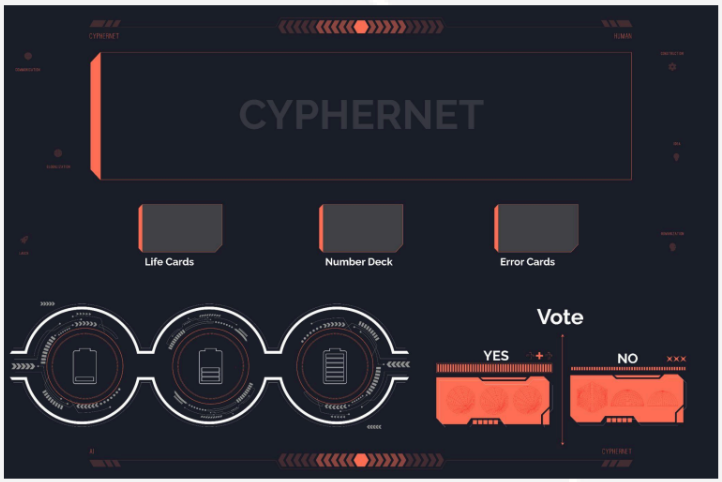
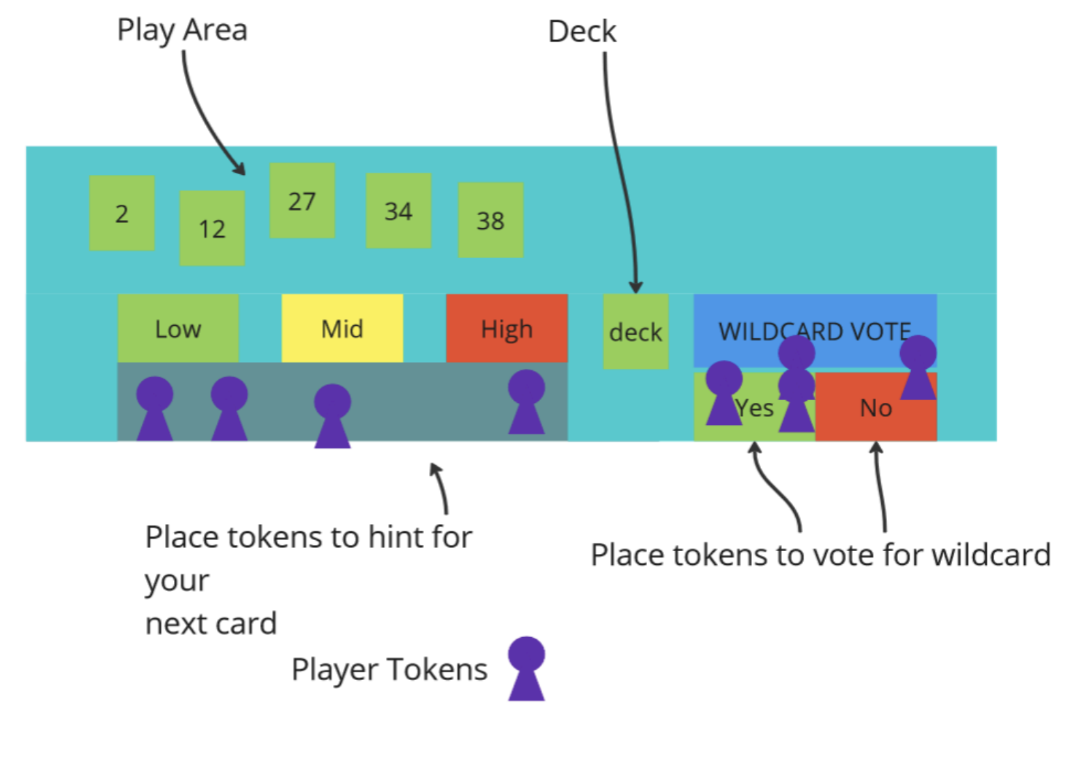
Players signal hand range via token placement — no numbers spoken
The central design challenge was building tension through restricted communication. Players hold numbered cards (1–100) and must play them in ascending order — but cannot say or signal their actual numbers. The only legal communication is placing a token in the Low / Mid / High zone on the board.
This forces players to read timing, hesitation, and energy rather than explicit information — creating genuine group psychology pressure with no hidden traitor or adversarial role. Each round adds one more card per player, deliberately scaling difficulty so early rounds teach the signal language and late rounds force real risk management.
When two players both signal the same zone and neither commits, a deadlock forms. Rather than forcing a random guess, we designed Re-Authenticate Encryption — a structured minigame for exactly two players in stalemate.
Both players set their hands face-down and draw a fresh card each, resolving that card via Low/Mid/High. The result establishes a temporary ordering — players then confidently reveal and play their stalled cards in the correct sequence. A failure state turned into a skillful recovery mechanic.
Key constraint: only two players can participate per Re-Authenticate. If three are deadlocked, someone must commit — a deliberate second pressure layer on top of the stalemate itself.
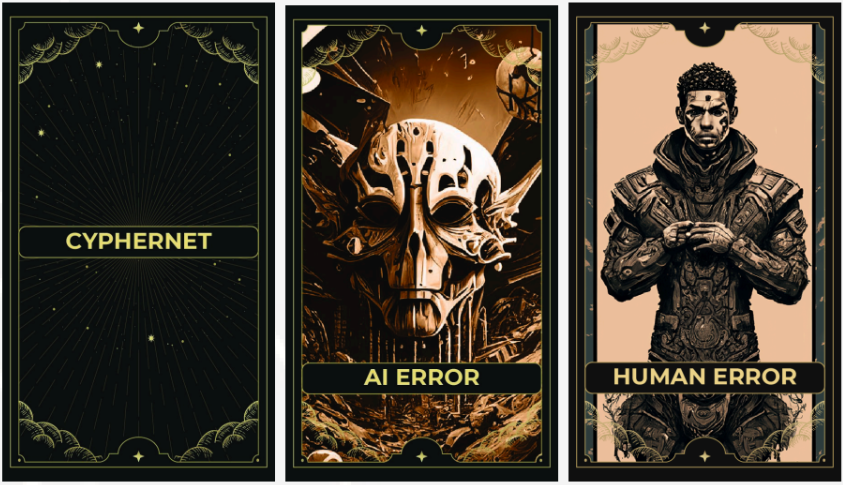
7 Human wildcards (penalties) vs 3 AI wildcards (advantages) — drawn from a separate pile
Two wildcard factions — 7 Human (penalties/disruptions) and 3 AI (advantages) — sit in a separate draw pile. Available wildcards scale with round number, so early rounds give fewer options and later rounds open up more strategic variance.
To draw, the entire group must vote using tokens on the Yes/No section of the board. Majority wins. This creates a second layer of real-time group negotiation — spending a wildcard too early wastes it, holding too long leaves the team exposed with no safety net.
The full team of five — every element designed, printed, and published in-house
CYPHERNET was built end-to-end with no external vendors or assets. The production pipeline covered every layer: game design and balance, card artwork (dark cyberpunk aesthetic — skulls, circuit motifs, faction iconography), physical board layout, life card design, a full printed rulebook, and a physical print run.
Published to Steam Workshop as a Tabletop Simulator mod for digital distribution. Every element — card backs, wildcard faction icons, board zones — was designed and executed by the team at George Brown College: Upmanyu Yavalkar, Dwip Makwana, Mayank Jain, Francisco Arbert, and Yash Mehrotra.